
This article show you way how to config CKEditor module and Google Code Prettify to this display code syntax hightlight
The organic post for CKEditor with WYSIWYG here http://www.larsbo.org/article/ckeditor-with-syntax-highlight-for-drupal-710
Install guide
- Install CKEditor module and Google Code Prettify with introduction on Drupal project page.
- Config CKEditor and Text formats to make sure your text format allow <pre> tag and 'Format' is selected

- Go to 'admin/config/user-interface/prettify' and setup the prettify library as you require.
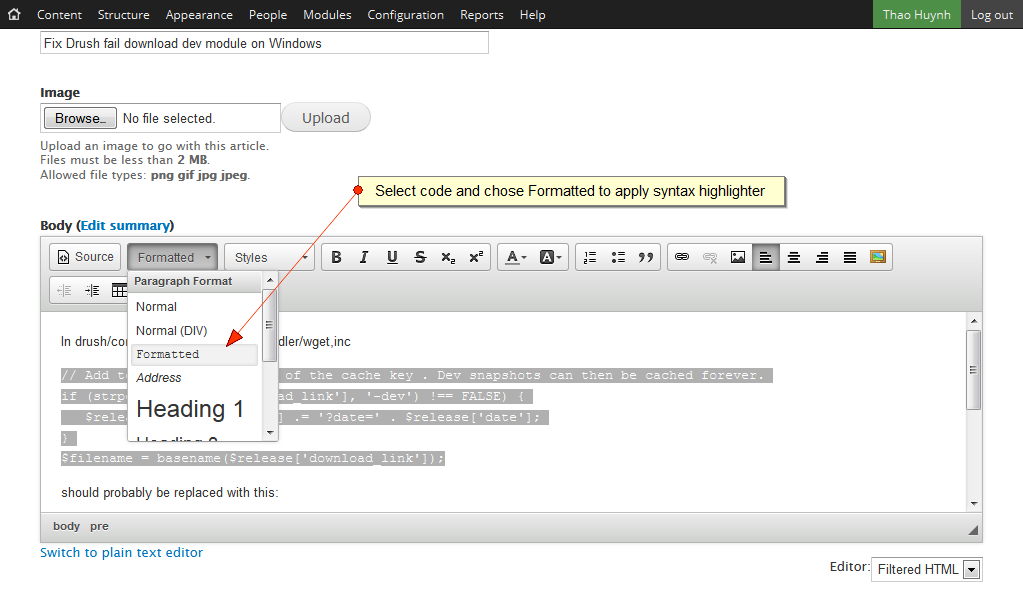
- Now you can add your code and select Formatted to make code code syntax hightlight.
Demo code highlight:
<?php

/**
 * @file
 * Initiates a browser-based installation of Drupal.
 */

/**
 * Defines the root directory of the Drupal installation.
 */
define('DRUPAL_ROOT', getcwd());

/**
 * Global flag to indicate the site is in installation mode.
 */
define('MAINTENANCE_MODE', 'install');

// Exit early if running an incompatible PHP version to avoid fatal errors.
if (version_compare(PHP_VERSION, '5.2.4') < 0) {
  print 'Your PHP installation is too old. Drupal requires at least PHP 5.2.4. See the <a href="http://drupal.org/requirements">system requirements</a> page for more information.';
  exit;
}

// Start the installer.
require_once DRUPAL_ROOT . '/includes/install.core.inc';
install_drupal();